Today I installed Clean Windows Web Server 2008 R2 64-bit with IIS 7.5. To my surprise opening .NET 4.0 application I received the following error:
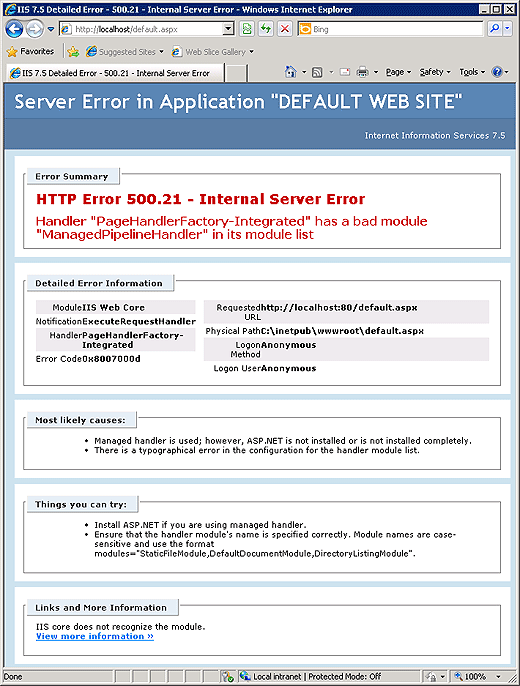
IIS 7.5 Detailed Error - 500.21 - Internal Server Error


Server Error in Application "DEFAULT WEB SITE"

Internet Information Services 7.5


[Error Summary]

HTTP Error 500.21 - Internal Server Error

Handler "PageHandlerFactory-Integrated" has a bad module "ManagedPipelineHandler" in its module list


[Detailed Error Information]

Module IIS Web Core

Notification ExecuteRequestHandler

Handler PageHandlerFactory-Integrated

Error Code 0x8007000d

Requested URL http://localhost:80/default.aspx

Physical Path C:\inetpub\wwwroot\default.aspx

Logon Method Anonymous

Logon User Anonymous


[Most likely causes:]

•Managed handler is used; however, ASP.NET is not installed or is not installed completely.

•There is a typographical error in the configuration for the handler module list.


[Things you can try:]

•Install ASP.NET if you are using managed handler.

•Ensure that the handler module's name is specified correctly. Module names are case-sensitive and use the format modules="StaticFileModule, DefaultDocumentModule, DirectoryListingModule".


[Links and More Information]

IIS core does not recognize the module.

View more information »
As it turns out, some glitch caused this problem, and somehow .NET was not registered with IIS.
Running the following commands solved this issue:
%windir%\Microsoft.NET\Framework\v4.0.30319\aspnet_regiis.exe -i
%windir%\Microsoft.NET\Framework64\v4.0.30319\aspnet_regiis.exe -i
Hi, Thank you for this post, it is very helpful I deployed my website and its working perfectly
Any other ideas this did not work for me.
Jeff,
You may need to change ‘v4.0.30319’ to your installed .NET version
Great Hint, works perfectly. Thanks!
Michael
That worked for me too – thanks.
Thanks its worked for me
this worked for me (using .netv4 with iis7 and win 7).
it’s working perfect.
thanks~
i am getting the same error but the tip didn’t work and the version is the same. any other ideas on what this could be?
thank you!
Many thanks it worked perfect.
Thanks very much for this perfect line. It’s work perfect for my anf save my time and my work.
100000000000000000000000 thanks.
This was great help. It solved my problem easily (I had to run command line as admin), but that was easily fixed.
Thanks!!!! Save my day…..
Work like a charm!!
100% right, I was forgetting the x64 path.
If this doesnt work, try a reboot and try again. That did it for me.
Thanks for this posting. It’s very important now my web server is fix. I can lounge my web site.
Thanks,
As if learning all this crap isn’t hard enough without stupid things like this popping up left and right. Thank you very much for posting this
Thanks.
worked !
Ohhhhh Bigggg Thank you Very much very very much
Still no luck for me. I have tried all these and same old error.
Anybody??
with %windir% it did not work for me. But as I took the complete Path (C:\Windows\…\aspnet_regiis.exe) it worked pretty well.
So thanks a lot!
your fix worked for me. Thanks a lot.
The error message is lousy
Hi guys
I cant seem to get this problem resolved. I did solve it, the first time before I reinstalled IIS, now its back again , and I notice the solution is for IIS 7 , Win 7 and VS 2010 / .NET 4. I also have 2010, but I’m working on VS2008 which means .NET 3.5, so is there any other way around this
This worked for me!! Thank you so much! <3
Will
Ey thanX a lot it worked perfect!!
Thanks, that did the trick.
Thank you very much! I have been searching around for an hour looking for a solution to this issue.
Like a boss. Thanks!
Thanks dear
A simple fix, thank you kindly!
Of the 4 development servers I have, 1 decided not to register .NET with IIS 7.5. I was given the grand tour of the Microsoft campus, again, courtesy of the MSDN web site. All I wanted was a simple answer for a simple question and wound up clicking one link after another on MSDN. Should’ve googled it out of the gate . . . but nooooo,!
I’ve bookmarked your site and will gladly recommend you to all! Thanks again
David
Great Post – Many thanks!
Works! Thank you :)
Thank you very much it worked for me as well.
I had to run it twice though because the first time it gave me an error. The second time I run it, it did give me an error also but in a different section which did not error out the first time, then restated IIS and viola!
Thanks for your post, you just helped me get past this issue within a minute of running into it.
Hi guys, i am getting this error and i was trying to understand what trick u guys used to solve it but i cudnt…………pls care to explain what i need to do. Thanks.
in my machine
for this path->%windir%\Microsoft.NET\Framework\v4.0.30319\aspnet_regiis.exe -i
aspnet_regii.exe does not exit,why?
Hi all
For those that have tried the above above and still no luck, try changing the managed pipeline mode to classic. In IIS 7.5 click on ‘Application Pools’ then double click the relevant application pool in the right hand window. Change the ‘Managed Pipeline Mode’ drop down box to ‘Classic’ and click ‘OK’.
Sorted it for me, hopefully it helps.
Thanks
Mat
Very tks man, fast solution
Thanks for the tip – it worked perfectly for me!
It Worked for me 2. Thanks a lot.
Thank you so much! it solved my problem.
Thanks, It also working for me.
Thanks it is all working..
Thank you! I always forget about this step when setting up a new server.
I dont have any “framework” folder in Microsoft .Net folder :( i installed framework 4 on my pc, i downloaded it and when i wanted to install ” repare or remove ” appeared !
it means i have installed it.
woot! Thanks!
Thanks, u rock!
It works!! Thank you so much :)
thanx a lot after so much effort i cudnt deploy it bt after reading ur post i cud successfully deploy my website
thanx a lot it rly hepld me a lot in deplyoing my website :-)
Thanks
Thanks for the comands, that fix my problem. I was getting the IIS server error:
HTTP Error 500.21 – Internal Server Error Handler “PageHandlerFactory-Integrated” has a bad module “ManagedPipelineHandler” in its module list.
Thanks !
Thank you for posting this. I spend 1 hour looking for a solution before I found one that worked which was this one. I and my client appreciate it.
thanks really
Thanks a lot. I try to find the solution from last 48 hours and at last ur tips works :)
Thanks Man Its great I solved my problem
Thanx
Thanks so much!!!
Worked great! Can’t believe MS doesn’t check these things :-(
Thanks for sharing, saved me a lot of time.
Thank you for sharing good information and really helpful for resolving HTTP Error 500.21 issue
great job :)
YES THIS COMMAND FOUND IN MY SOLUTION, I HAVE WINDOWS 7 64 BIT AND MY APLICATION RUNNING LOCAL.
thank you very much.It resolve my problem
Thanks You…solved it immidiately…
This has helped me twice. So thanks x2. Cheers.
hi
thanks for your solotion
but i resive that error yet.
pls solve my problem
Thanx a lot,
it’s working…
how do i run the commands
Thank you sooooo much
it really helped me :-)
i run this command in command prompt but still i am getting error .
please help me .
This really works for me!!!
Thx a lot..
To hhh: windows-key + R –> type “cmd” –> enter –> type there
thanks a lot your post was very usefull for me
you’re awesome. This worked like a charm!
This post just straight-up saved my freaking *55 man!!
Big up!
Big up!
Huh :-x
Tried this also, still getting same issue.
Even changed App Pool and Mode still no output….
Trying from last 48 Hrs its getting frustated…
Please help me..
hi
it is useful but small request i do not have admin rights so what to do now if this problem
occur how i can solve please i want urgently.
Its really help me to deploy my solution.thanks ton.keep posting stuff like this.
thanks again.
Thank you, Maris!!! Your article helped me a lot! Greetings from Bulgaria :)
YEAH! Thanks a lot!
thanks buddy it help me lot ………………. keep gng ………
appreciate the help and the time it saved!
Spot on, fixed the issue for me, thanks!
thanx a lot !!! God bless u :)
Thanks a lot – the command helped! Thumbs up…..
Thanks a lot
Even after running the command , its not working for me…… I have deployed the Biztalk app on IIS and when run , its giving the same error….
hi thanks lot.
Thanks a ton Man..couldn’t have been better…
Thank you, worked like a charm.
Thanks
now my issue fixed.
Thanks so much!!
Thank you very much!
Gracias
thanks a lot …
it is really helpful to me :)
Thank very much!!!
Thank you so much…you saved me unknown amounts of time…
Worked Great! Thanks!
Thank you very much. This solved an issue that took me an afternoon to figure out!
Thanks
Thnx a lot …:)
Thanks a lot…
Fixed it, thanks!! Don’t ya just hate programmers with misnomer error messages, arg.
THANKS – I had this issue on my development machine
Thanks a lot…..
Thank you
Sir i am following these steps and typing command in cmd prompt command is running successfully but project is not done same error’s are occurring…….. So sir please tell me the solution ….
Thank you very much sir
Yea Its working,… Thnks !!!!!!!!
Thanks!!! Saved The WorlD!
thanks
Thank you, sir!
Thanks for your post. Got the same error and the commands resolved it.
Thank you very much dude.. That solved my issue
Thanks sir…………….. :)
its works…
Thanks !!!
I have the same error but on a different module as shown below. I am unable to get this issue fixed with the fix given here. Could you please tell other possible ways to fix this error ?
” Handler “ExtensionlessUrlHandler-ISAPI-4.0_32bit” has a bad module “IsapiModule” in its module list “
THANKS – I had this issue on my development machine
You are number 1 in my book. Thanks
I installed IIS 7.5 on my Windows 7 and this error occur when directory browsing. Default Web Site fine except subdirectory access have this error.
I run it on the dos command and it works! That’s what I like about bing internet search. Good job!
Sir I have the same problem but when i run this command in command promt it SAYS
‘%windir%\Microsoft.NET\Framework\v4.0.30319\aspnet_regiis.exe -i’ is not non internal or external command. how to fix this problem?
thanks…..it works!!! :)
C:\Windows\Microsoft.NET\Framework64\v4.0.20506
ERROR REPORT
HTTP Error 500.21 – Internal Server Error
Handler “PageHandlerFactory-Integrated” has a bad module “ManagedPipelineHandler” in its module list
WHAT CAN I DO NOW …?
Thanks, it worked perfectly
This happens when VS2010 is installed after VS2012. I solved it by following Microsoft’s instructions from the following page:
http://msdn.microsoft.com/en-us/library/hh168535(v=nav.71).aspx
Thanks!!
hi its working fine thank you so much
Thanks a lot..
Thanks..
thanks man
“%windir%\Microsoft.NET\Framework\v4.0.30319\aspnet_regiis.exe -i” works.
Thank you!
“%windir%\Microsoft.NET\Framework\v4.0.30319\aspnet_regiis.exe -i” works for me.
Thank you million times!!!!!
Its 100% Working
%windir%\Microsoft.NET\Framework\v4.0.30319\aspnet_regiis.exe -i
Thanks!!!!!!!!!!!
Awesome Thanks!!
Thank you! This worked and was the last piece to get the site up and running.
Awesome! It worked for me. Thanks a lot!
Thanks
Thanks it also Worked For me. i have to run both Commands.
First go to
Start Button=>All Programs=>Accessories=>Command Prompt(Right click then Run as Administrator )
finally Type both Line
%windir%\Microsoft.NET\Framework\v4.0.30319\aspnet_regiis.exe -i
press Enter
%windir%\Microsoft.NET\Framework64\v4.0.30319\aspnet_regiis.exe -i
and then Press Enter
and refresh your Page
Thanks for Help ;-)
it worked for me thanks alot.
was really helpfull, it work!!! thanks
Thanks a lot. It worked for me.
Thank You A loooooooot it helped me With A client Of mine :)
my 32Bit OS
%windir%\Microsoft.NET\Framework\v4.0.30319\aspnet_regiis.exe -i
It worked for me
1B thanks
Thanks bro, it work!!!